SEO for SaaS: a Search Console playbook for busy founders
By Pierre, founder of Rankhop · Published on · Updated on
You verified your domain in Google Search Console a while ago, and it has been recording impressions, clicks and positions for your pages ever since. Most weeks nobody opens it, because a release, a support queue or a sales call comes first. If that sounds like your team, this page is for you.
At this stage, SEO for SaaS is a narrow job: read what Search Console already knows, find the few pages where a small edit could matter, make the edit, and check back later. Content calendars and link building have their place (see below), but they are not where a founder with one free hour a week should start.
In short
- Search Console already records impressions, clicks, CTR and average position for every page of your SaaS site.
- Three checks cover most early wins: product queries on page two, pricing or feature pages with a weak CTR, and docs or changelog pages competing with a feature page.
- Look at non-branded queries first, so searches for your own name don't flatter the numbers.
What a SaaS site looks like in Search Console
A SaaS website is really several sites sharing one domain: marketing pages, pricing, docs, a blog, a changelog. Search Console mixes them all in the same Performance report, which shows clicks, impressions, CTR and average position, grouped by queries, pages, countries, devices, search appearance or dates (Google: Performance report).
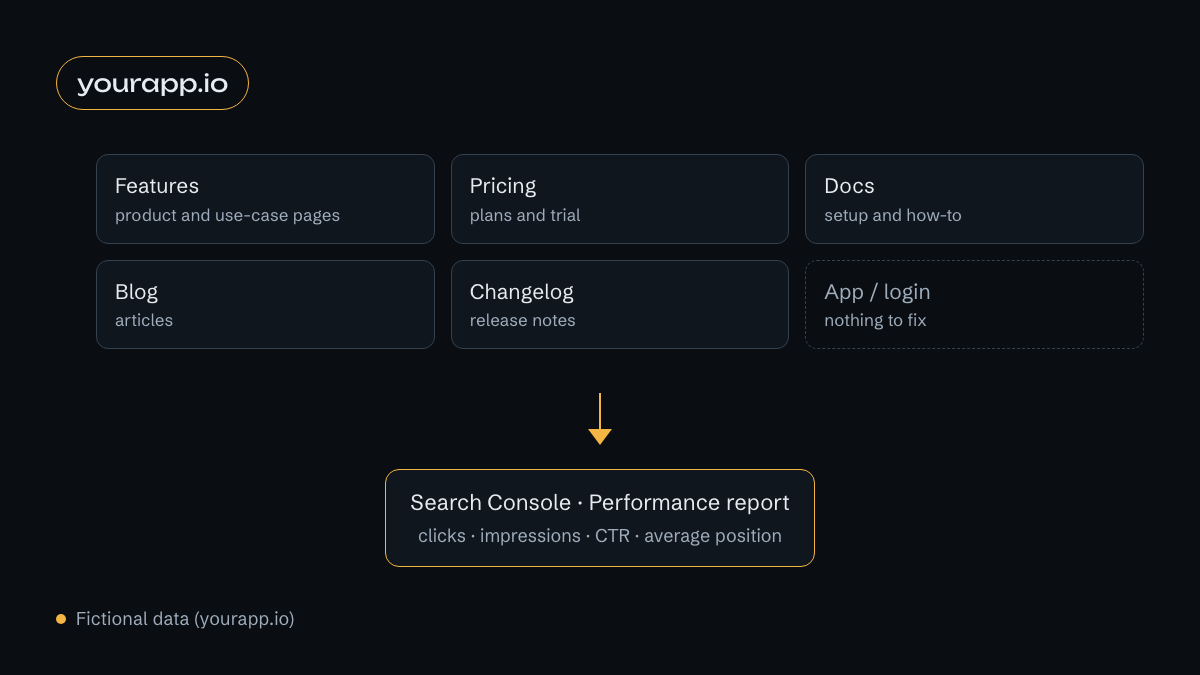
| Page type | Illustrative queries (fictional) | What to watch in Search Console |
|---|---|---|
| Feature and use-case pages | "invoice approval software" | Product queries sitting just outside the top 10 |
| Pricing page | "invoicing tool pricing", "yourapp pricing" | CTR compared with other pages at a similar position |
| Docs and help center | "connect yourapp to slack" | Docs pages picking up evaluation queries meant for a feature page |
| Blog | "how to set up invoice approvals" | Overlap with feature pages on the same topic |
| Changelog and release notes | "yourapp slack integration" | Release posts competing with the feature or integration page |
| Integrations, templates, comparisons | "slack invoice integration", "invoice template" | Page-two positions, overlap with docs |
| Login and app URLs | "yourapp login" | Nothing to fix; leave them out of your analysis |
Three Search Console mechanics change how SaaS data reads:
- Position is the topmost one. When several of your links appear for a query, Search Console records the topmost position; in Google's example, a site shown at positions 2, 4 and 6 counts as 2. Average position then averages that value across all impressions (Google: metric definitions). A query at 11.4 can be on page one for some searches and on page two for others.
- Property totals and page totals differ. Aggregated by property, all results for the same query pointing to your property are counted once; aggregated by page, each unique URL is counted separately. Google notes that CTR and average position are generally higher when aggregating by property if several of your pages appear (Google: about the data). On a SaaS domain, this is where overlap hides: a query looks healthy in the Queries view, then splits across three URLs once you open Pages.
- The newest data is provisional. Google says the newest data can be preliminary and might change in the next few hours (Google: Performance report). Don't read anything into a dip on the last day of a launch week.
Separate branded and non-branded queries first
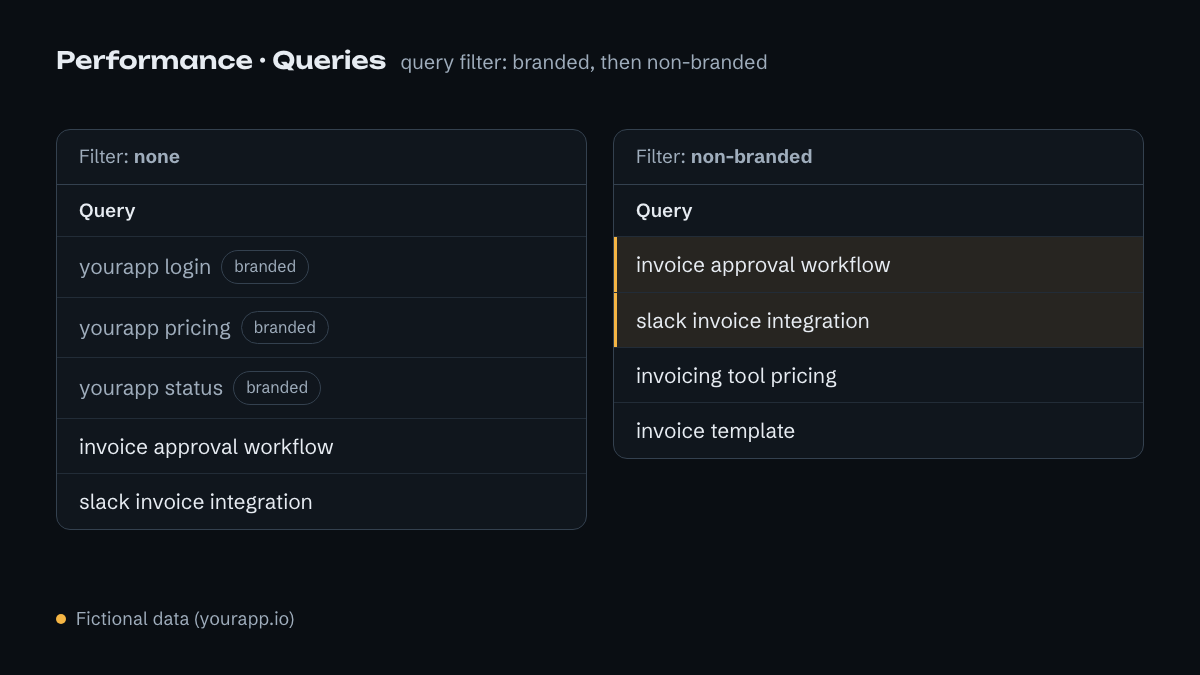
On a SaaS site, your own name pulls in a lot of impressions: "yourapp login", "yourapp pricing", "yourapp status". Those searches show that people already know you. They say little about whether new prospects find your pages. Mixed with category queries, they make every average look better than it is.
Search Console can now do the split. Its Performance report has a branded queries filter, announced in November 2025 and available to all eligible sites since March 2026. It sorts queries into branded and non-branded with an AI-assisted classification that also catches typos and product names (Google: branded queries filter). Google notes that the filter isn't available for sub-properties such as a /blog/ folder or for sites with a low number of impressions, and that some queries may be misclassified (Google: Insights report).
If the filter isn't there for your site yet, add a query filter that excludes your brand name and its common misspellings. Then run the three checks below on non-branded queries first.
Three checks a founder can run this week
Each check uses one view of the Performance report and ends with one change to one page.
1. Product queries stuck on page two
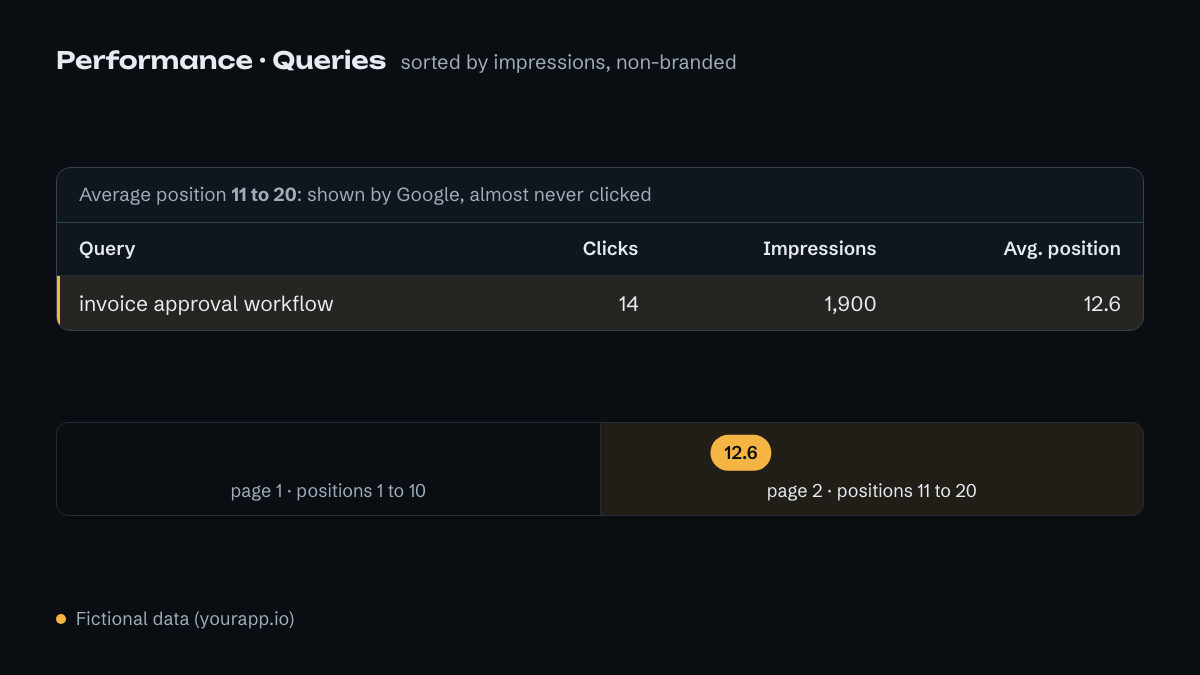
Open Queries, sort by impressions, and look for average positions between 11 and 20. The ones worth your time are category and problem queries that map to a feature or use-case page.
Fictional data: yourapp.io, an invoicing tool, sees "invoice approval workflow" at an average position of 12.6, with 1,900 impressions and 14 clicks over three months. Nearly all impressions go to /features/approvals/. The page shows the approval screen but never explains the steps or uses the word "workflow."
A reasonable first move: add a short "How the approval workflow works" section, then link to the page from the two docs articles that cover approvals. Note the date and recheck in a few weeks. The step-by-step method is in our guide to SEO quick wins from Search Console.
2. Pricing and feature pages: high impressions, low CTR at a good position
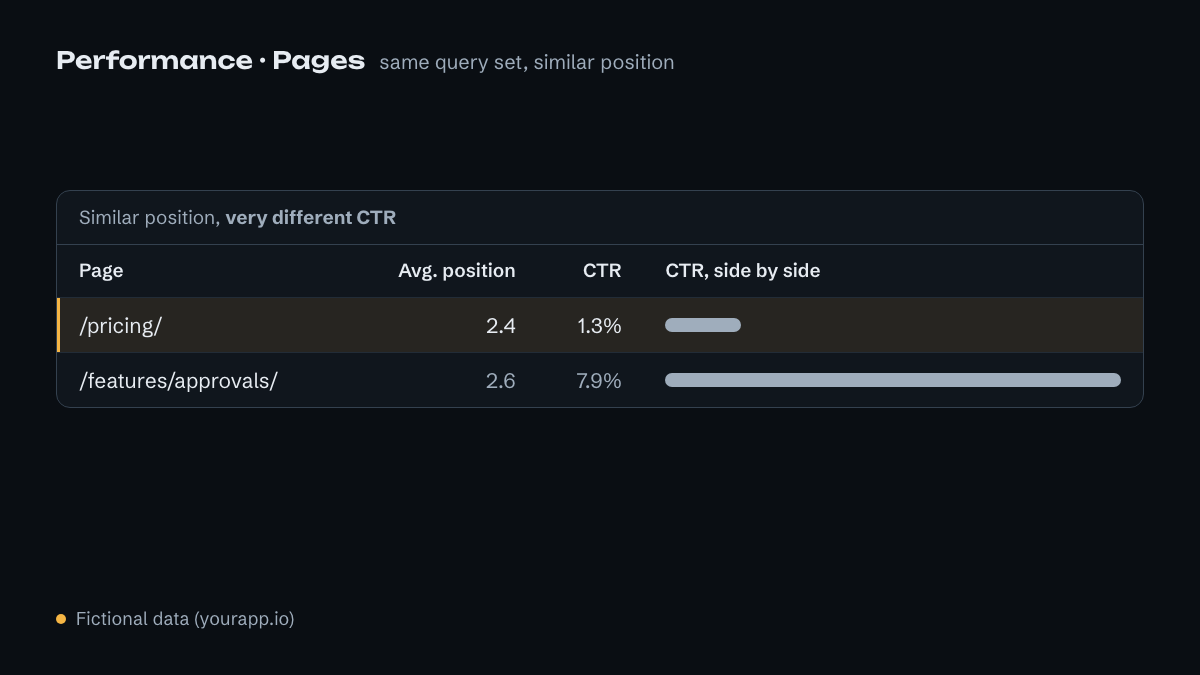
Switch to Pages, sort by impressions, and compare CTR between pages with similar average positions. CTR is simply clicks divided by impressions (Google: metric definitions). Compare your pages with each other, not with CTR curves published elsewhere.
Fictional data: yourapp.io's /pricing/ has an average position of 2.4 and a CTR of 1.3%. /features/approvals/, at a similar position (2.6), gets 7.9%. The pricing page's title is "Pricing | YourApp" and it has no written meta description.
Someone searching "invoicing tool pricing" wants to know how you charge before they click: per seat or flat, free plan or trial, monthly or annual. A title and description that answer those questions are the obvious edit. More in how to improve CTR with Search Console.
3. Docs, blog and changelog competing with your feature page
Pick a feature name, filter Queries on it, then open the Pages view for that query. If two or three URLs share the impressions, you are looking at cannibalization.
Fictional data: for "slack invoice integration," yourapp.io gets impressions on /integrations/slack/, /docs/slack-setup/ and /changelog/slack-is-live/. The Queries view shows a decent position because it reports the topmost one; page by page, each URL sits lower.
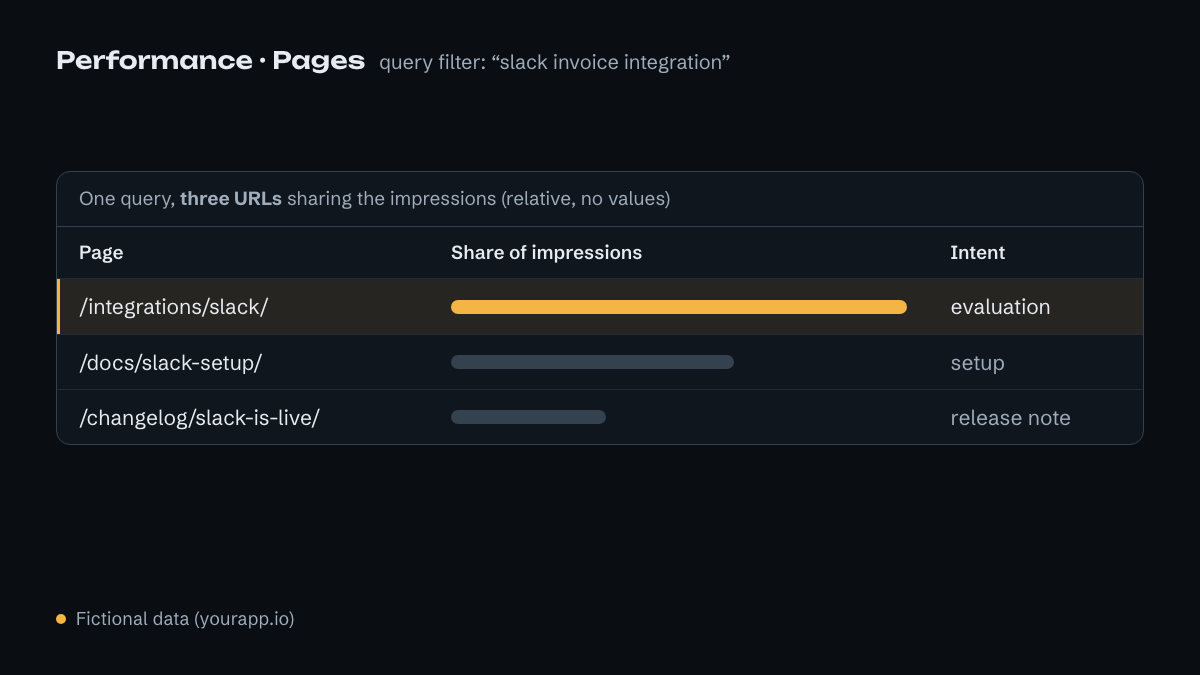
Decide by intent. The integration page should own evaluation queries ("slack invoice integration"); the docs page should own setup queries ("how to connect yourapp to slack"). A release post rarely needs to rank for the feature itself: retitle it around the release ("March release: Slack notifications") and link it to the integration page. If two pages say almost the same thing, merge them and redirect one. Our keyword cannibalization guide covers how to choose the page to keep.
A weekly rhythm that survives a release cycle
SEO competes with shipping, so keep the routine small:
- One check per week, not three. Rotate: page-two queries, then CTR, then overlap.
- Log every change with its date, wherever you already track releases.
- Recheck with the same filters, on a date range that starts after the change and leaves out the most recent days.
- Ignore what won't pay off. Branded navigation queries and app URLs show up a lot but need nothing. Filter your brand name out of the Queries view, and skip queries with almost no impressions.
AI Overviews and AI Mode in your Search Console data
Founders often ask whether AI answers are taking their clicks. Search Console gives you two places to look.
- They are already in your totals. Google counts appearances in AI Overviews and AI Mode in the Performance report, under the Web search type (Google: AI features and your website).
- There is now a dedicated view. In June 2026, Google launched Generative AI performance reports for Search and Discover, rolled out to all websites by August 31, 2026. They show impressions, pages, countries, devices and dates for your URLs in generative AI features (Google: Generative AI performance reports).
- No special markup or AI-specific file is needed: AI Overviews use the same indexing and snippet rules as regular Search, as long as the page is indexed and eligible for a snippet (Google: AI features and your website, last updated 10 December 2025).
Read the AI view as one more signal of which queries a page is relevant for. The three checks above still decide what to change.
Agency, full SEO suite or weekly action email?
- An agency or consultant fits when you need someone to own SEO: producing content, planning a site migration, fixing technical issues on the marketing site, or building a strategy for a new market.
- A full SEO suite fits when you need data Search Console doesn't have: competitor keywords, backlinks, rank tracking, research on topics you don't rank for yet.
- A weekly action email fits when your site is already verified in Search Console, the data is there, and what you lack is the time to read it and decide what to change.
Where Rankhop fits
The three checks above match the three things Rankhop looks for. It reads your Search Console and emails you the result, so you don't have to open the report. The facts (source: rankhop.app):
- Data: your Search Console performance data (queries, pages, impressions, clicks, positions). GA4 is read only if you tick that option.
- Access: read-only Google access, which you can revoke anytime.
- Email: one short email a week, around 7:30 am Paris time, with 3 ranked actions: the page and what to change. Actions don't repeat from one week to the next.
- What it flags: queries near the top 10 (positions 11 to 20), pages with an unusual CTR, and cannibalization.
- Languages: English, French or Spanish.
- Good fit: SaaS, online stores, blogs and WordPress sites verified in Search Console; freelancers and small agencies.
- Not a fit: sites that aren't in Search Console, or teams that need a full SEO suite with competitor keywords, backlinks and rank tracking.
Here is what a week could look like for the fictional app used on this page:
Illustration, fictional data (yourapp.io)
- "invoice approval workflow," position 12.6 on /features/approvals/: add a section that walks through the approval steps, and link to it from two docs articles.
- /pricing/, position 2.4 with a 1.3% CTR: rewrite the title and description to state how you charge and mention the free trial.
- "slack invoice integration," split between /integrations/slack/ and /docs/slack-setup/: make the integration page the target and link to it from the docs.
Pricing: Start with the free instant preview (home page, robots.txt and sitemap, no account). Then connect Google and get your 3 priority actions by email, free. From your account, you can then start the 15-day free trial (no credit card, 1 site, two emails). After that, the subscription sends 3 fresh priority actions every week: $12/month or $99/year per site, with 20% off from 3 sites and 35% off from 10.
Read-only access. Start the trial from your account: no credit card, 1 site during the trial.
FAQ
What does SEO for SaaS mean for a small team?
For a small SaaS team with Search Console set up, it mostly means acting on data you already have: product queries close to the top 10, pricing and feature pages with a weak CTR, and docs, blog or changelog pages competing with feature pages for the same query.
Should docs pages and feature pages target the same keyword?
Usually not. Let feature pages own evaluation queries and docs pages own setup and how-to queries, then link between them. If two pages say nearly the same thing, merging them is often simpler.
Why does my pricing page rank well but get few clicks?
A good average position means your page is shown; CTR, which Search Console calculates as clicks divided by impressions, tells you whether people choose it. Compare it with your other pages at similar positions, then check whether the title and description say how you charge, whether there is a free plan or trial, and who the product is for.
Should I filter my brand name out before analysing Search Console?
For most checks, yes. Searches like "yourapp login" inflate CTR and average position. Use Search Console's branded queries filter if your site has it, or a query filter that excludes your brand name.
Does Search Console show AI Overviews for my site?
Yes. Appearances in AI Overviews and AI Mode are counted in the Performance report under the Web search type, and since 2026 Search Console also has Generative AI performance reports with impressions by page, country, device and date.
Does Rankhop replace an SEO agency or an SEO suite?
No. Rankhop sends one email a week with 3 ranked actions based on your Search Console data. It does not do competitor keyword research, backlink analysis or rank tracking, and its Google access is read-only.
How much does Rankhop cost?
$12/month or $99/year per site, with 20% off from 3 sites and 35% off from 10. The 15-day free trial needs no credit card and covers 1 site.
Read-only access. Start the trial from your account: no credit card, 1 site during the trial.